An autonomous AI agent with web frontend, desktop control, and multi-LLM support







Control your Linux desktop with natural language. Receive tasks via WhatsApp. Search your knowledge base. Automate everything.
Live Demo · Report Bug · Request Feature · Contribute
- Overview
- Key Features
- Architecture
- Tech Stack
- Screenshots
- Installation
- Configuration
- Skill System
- WhatsApp Integration
- Knowledge Base
- API Reference
- Contributing
- Third-Party Licenses
- License
Jarvis is a self-hosted, autonomous AI desktop agent that runs on a Linux server. It combines a polished web frontend with real desktop control — you can watch and direct the agent as it works, right in your browser.
The core idea: give Jarvis a task (via chat, WhatsApp, or the web UI), and it figures out how to complete it — browsing the web, reading files, writing code, sending emails, managing your calendar — all while you observe through a live VNC split-screen view.
"Find all emails from last week about Project Alpha, summarize them,
 and create a calendar event for the follow-up meeting."
Jarvis handles it. You watch it happen.
The web interface shows your LLM chat and a live desktop feed side by side. The agent can see exactly what it's doing — screenshots feed back into the LLM context automatically. No more blind automation.
Skills are self-contained Python packages that extend Jarvis with new capabilities. Install, enable, disable, and configure them through the UI without touching config files. Compatible with openclaw skills.
Switch between AI providers without restarting anything:
- Google Gemini (gemini-2.0-flash, gemini-1.5-pro, ...)
- Anthropic Claude (claude-opus-4, claude-sonnet-4, ...)
- OpenRouter (hundreds of models)
- Local Ollama (llama3, mistral, qwen2.5, ... — fully offline)
- Any OpenAI-compatible endpoint
Both native tool/function calling and prompt-based tool calling are supported — so even models without native tool support can use all of Jarvis's capabilities.
Send Jarvis a voice note or text message on WhatsApp, get a response back. Voice messages are transcribed via faster-whisper (runs locally, no cloud). Perfect for mobile task delegation.
Drop PDFs, DOCX files, or plain text into watched folders. Jarvis indexes them with TF-IDF and can search them during tasks. Multi-folder support, automatic re-indexing on file changes.
Manage Gmail, Google Calendar, and Google Drive through natural language commands — powered by the openclaw/gog CLI.
Full browser control via CDP (Chrome DevTools Protocol) and xdotool. The agent can navigate websites, fill forms, click elements, and extract information.
- HTTPS with self-signed certificates (auto-generated)
- Session-based authentication
- All external services proxied through the FastAPI backend
┌─────────────────────────────────────────────────────────────┐
│                        Browser Client                        │
│   ┌──────────────┐  ┌──────────────┐  ┌──────────────────┐  │
│   │  LLM Chat UI │  │  noVNC :6080 │  │  Settings / Skills│  │
│   │  (WebSocket) │  │  (Live VNC)  │  │  WhatsApp Logs   │  │
│   └──────┬───────┘  └──────┬───────┘  └────────┬─────────┘  │
└──────────┼────────────────┼────────────────────┼────────────┘
           │ WSS/HTTPS       │ WSS                │ HTTPS
           ▼                 ▼                    ▼
┌─────────────────────────────────────────────────────────────┐
│                   FastAPI Backend :8000                       │
│   ┌─────────────┐  ┌────────────┐  ┌──────────────────────┐  │
│   │ JarvisAgent │  │ Skills API │  │  WhatsApp Proxy      │  │
│   │  (agent.py) │  │ /api/skills│  │  _wa_bridge_async()  │  │
│   └──────┬──────┘  └─────┬──────┘  └──────────┬───────────┘  │
│          │               │                     │              │
│   ┌──────▼──────────┐    │              ┌──────▼───────────┐  │
│   │   SkillManager  │◄───┘              │  Baileys Bridge  │  │
│   │  (skills/*.py)  │                   │  Node.js :3001   │  │
│   └──────┬──────────┘                   │  (localhost only)│  │
│          │                              └──────────────────┘  │
│   ┌──────▼──────────────────────────────────────────────────┐ │
│   │                      Tool Layer                          │ │
│   │  shell · desktop · filesystem · screenshot · memory     │ │
│   │  knowledge · browser_control · whatsapp · google_apps   │ │
│   └──────────────────────────────────────────────────────────┘│
│                                                               │
│   ┌──────────────┐    ┌──────────────┐    ┌───────────────┐  │
│   │  LLM Client  │    │  x11vnc :5900│    │  Xvfb/X11 :1  │  │
│   │  (llm.py)    │    │  (→ noVNC)   │    │  Openbox WM   │  │
│   │  Multi-Provider│  └──────────────┘    └───────────────┘  │
│   └──────────────┘                                            │
└─────────────────────────────────────────────────────────────┘
| Component | File | Description |
|---|---|---|
| FastAPI Server | backend/main.py |
HTTP/WebSocket endpoints, auth, WhatsApp proxy |
| Agent Loop | backend/agent.py |
Task execution, tool calling, LLM orchestration |
| LLM Client | backend/llm.py |
Multi-provider abstraction (Gemini, Claude, OpenRouter, Ollama) |
| Config | backend/config.py |
Environment + settings.json management |
| Skill Manager | backend/skills/manager.py |
Load, enable, disable, configure skills |
| Tool Base | backend/tools/base.py |
BaseTool class all tools inherit from |
| WhatsApp Bridge | services/whatsapp-bridge/index.js |
Baileys v7 + Express API |
| Frontend | frontend/index.html + js/ |
Single-page app, no build system required |
| Technology | Version | Purpose |
|---|---|---|
| Python | 3.13 | Core runtime |
| FastAPI | latest | REST API + WebSocket server |
| uvicorn | latest | ASGI server |
| faster-whisper | latest | Voice transcription (CPU, int8) |
| Technology | Purpose |
|---|---|
| Vanilla JS | Zero-dependency UI |
| CSS Custom Properties | Dark Glassmorphism theme |
| WebSocket API | Real-time agent communication |
| noVNC | In-browser VNC client |
| Technology | Purpose |
|---|---|
| Xvfb | Virtual framebuffer (headless X11) |
| Openbox | Lightweight window manager |
| x11vnc | VNC server for X11 session |
| websockify | WebSocket-to-TCP proxy (noVNC bridge) |
| xrdp | RDP access to existing desktop session |
| xdotool | X11 automation (keyboard, mouse, window management) |
| Technology | Purpose |
|---|---|
| Node.js 20+ | WhatsApp bridge runtime |
| Baileys v7 | WhatsApp Web API (no official API required) |
| Express | HTTP API for bridge ↔ backend communication |
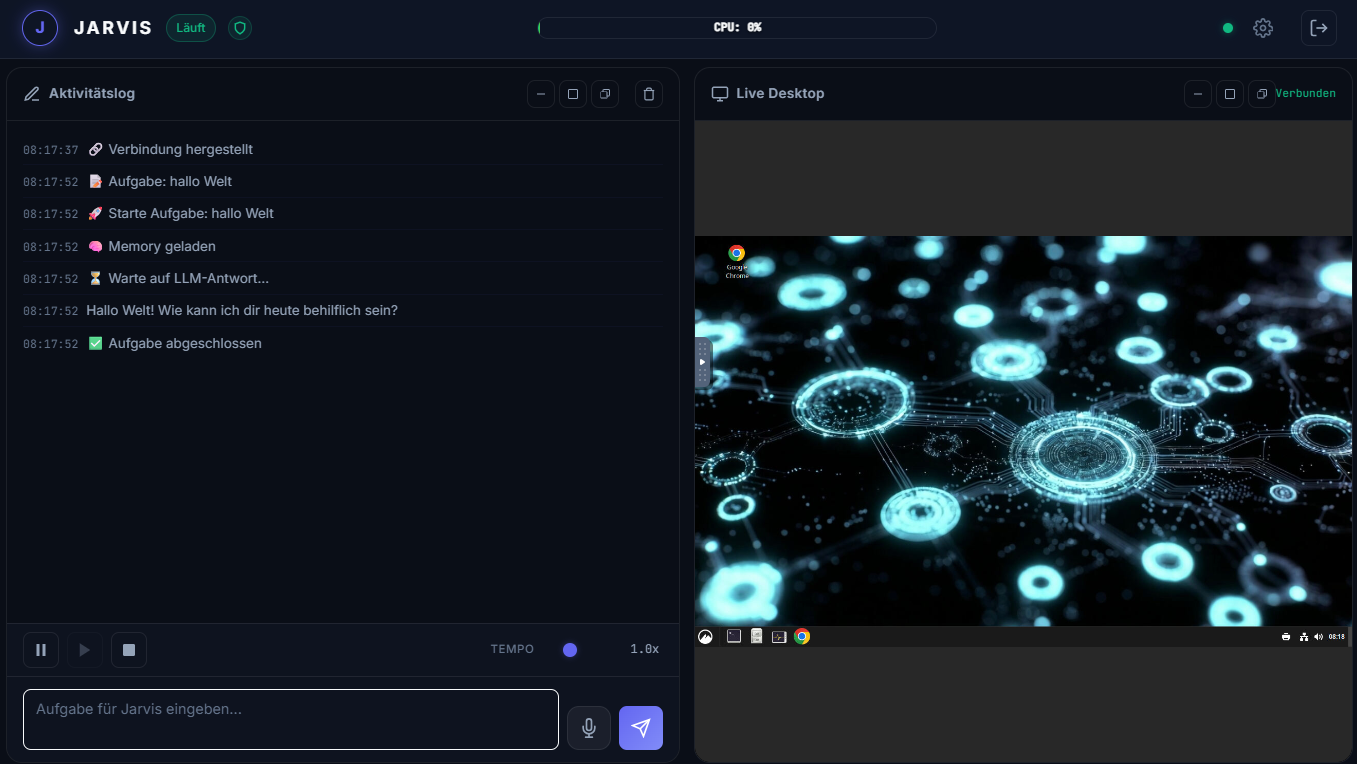
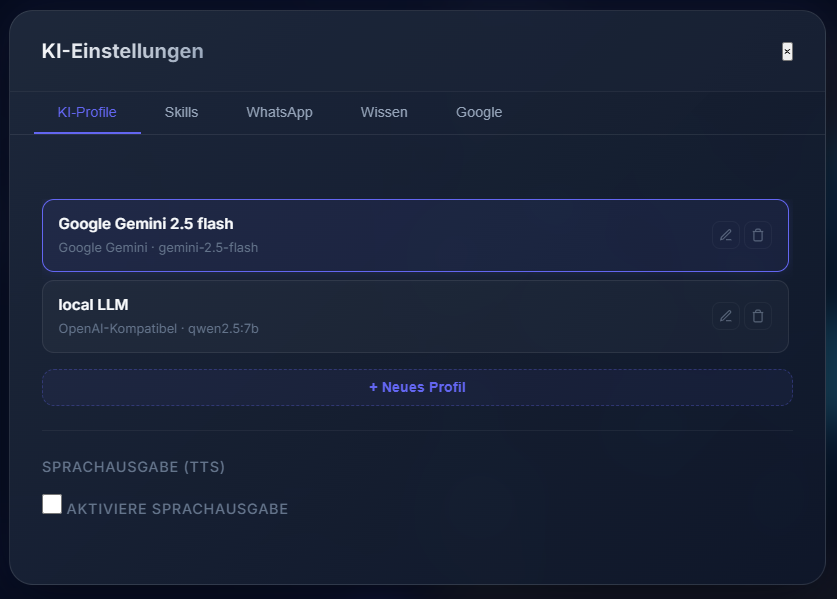
 Send tasks via WhatsApp text or voice note, receive structured responses.
# Debian/Ubuntu
sudo apt-get update && sudo apt-get install -y \
  python3.13 python3.13-venv python3-pip \
  nodejs npm \
  git \
  xvfb x11vnc openbox \
  websockify \
  xdotool \
  ffmpeg  # for audio processing
Note: Node.js 20+ is required. Use nvm if your distro ships an older version.
# 1. Clone the repository
git clone https://github.com/dev-core-busy/jarvix.git
cd jarvix

# 2. Create Python virtual environment
python3 -m venv venv
source venv/bin/activate

# 3. Install Python dependencies
pip install -r requirements.txt

# 4. Install WhatsApp bridge dependencies
cd services/whatsapp-bridge
npm install
cd ../..

# 5. Configure environment
cp .env.example .env
nano .env   # Add your API keys (see Configuration section)

# 6. Start Jarvis
./start_jarvis.sh
Open your browser at https://your-server-ip:8000 and log in with jarvis/jarvis.
Self-signed certificate: Your browser will warn about the certificate on first visit. This is expected — accept the exception.
# Copy service files
sudo cp services/systemd/jarvis.service /etc/systemd/system/
sudo cp services/systemd/whatsapp-bridge.service /etc/systemd/system/

# Enable and start
sudo systemctl daemon-reload
sudo systemctl enable jarvis.service whatsapp-bridge.service
sudo systemctl start jarvis.service whatsapp-bridge.service

# Check status
sudo journalctl -u jarvis.service -f| Port | Service | Access |
|---|---|---|
| 8000 | FastAPI (HTTPS) | External |
| 6080 | noVNC (WSS) | External |
| 5900 | x11vnc | Local only |
| 3001 | WhatsApp Bridge | Local only |
All configuration lives in .env (secrets) and data/settings.json (UI-managed settings).
# ── LLM Providers ──────────────────────────────────────────────
GOOGLE_API_KEY=your_gemini_api_key
ANTHROPIC_API_KEY=your_claude_api_key
OPENROUTER_API_KEY=your_openrouter_api_key

# Local Ollama (no key needed — just set the base URL)
OLLAMA_BASE_URL=http://localhost:11434

# ── Authentication ──────────────────────────────────────────────
JARVIS_USERNAME=jarvis
JARVIS_PASSWORD=jarvis          # Change this in production!
SECRET_KEY=change-me-to-a-random-string

# ── WhatsApp ────────────────────────────────────────────────────
WA_ALLOWED_NUMBERS=+4915112345678,+4917098765432  # Comma-separated whitelist

# ── Optional ────────────────────────────────────────────────────
DISPLAY=:1                      # X11 display for desktop control
KNOWLEDGE_DIRS=/data/docs,/home/jarvis/notes # Watched knowledge foldersUse the Settings panel in the web UI to switch providers and models at runtime — no restart required.
For local Ollama, make sure Ollama is running (ollama serve) and select "Ollama" as provider in the UI.
Skills extend Jarvis with new capabilities. Each skill is a self-contained Python package:
skills/
  my_skill/
    skill.json    # Manifest
    main.py       # Tool definitions
    requirements.txt  # Optional extra dependencies
{
  "name": "my_skill",
  "display_name": "My Awesome Skill",
  "version": "1.0.0",
  "description": "Does something awesome",
  "author": "Your Name",
  "tools": ["MyTool"],
  "config_schema": {
    "api_endpoint": {
      "type": "string",
      "description": "The API endpoint URL",
      "required": true
    }
  }
}from backend.tools.base import BaseTool
class MyTool(BaseTool):
name = "my_tool"
description = "Does something specific and useful"
async def execute(self, param1: str, param2: int = 10) -> str:
# Your implementation here
return f"Result: {param1} with {param2}"
def get_tools(config: dict) -> list:
return [MyTool(config=config)]| Skill | Description |
|---|---|
browser_control |
CDP + xdotool browser automation |
whatsapp |
Send/receive WhatsApp messages |
google_apps |
Gmail, Calendar, Drive via gog CLI |
example_skill |
Template for new skill development |
- Place the skill folder under
skills/ - Restart Jarvis or use the Skills API:
POST /api/skills/reload - Enable in the web UI under Settings → Skills
openclaw compatibility: Skills built for the openclaw ecosystem work with Jarvis's skill loader with minimal adaptation.
Jarvis is fully compatible with the OpenClaw skill format.
OpenClaw is a growing ecosystem of AI agent skills. Jarvis can import any OpenClaw skill package directly — just drop the skill folder into skills/ and it's ready to use.
| Without OpenClaw | With OpenClaw |
|---|---|
| Write every tool from scratch | Reuse existing skills instantly |
| Limited to built-in capabilities | Access a growing ecosystem |
| Skills locked to one agent | Skills work across OpenClaw agents |
Jarvis ships with 3 production-ready OpenClaw skills out of the box:
| Skill | Description |
|---|---|
openclaw_gmail |
Full Gmail integration via gog CLI (send, read, search, manage) |
agent_orchestrator |
Orchestrate multiple sub-agents for complex parallel tasks |
agent_autonomy_kit |
Heartbeat monitoring, task queuing, autonomous operation |
# 1. Download any OpenClaw-compatible skill package
# 2. Drop it into the skills/ directory
cp -r my_openclaw_skill/ skills/

# 3. Reload via API (no restart needed!)
curl -X POST https://localhost:8000/api/skills/reload

# 4. Enable in UI: Settings → Skills → toggle ON
Or use the built-in import workflow in Jarvis:
Task: "Import the OpenClaw skill from /path/to/skill_package"
Jarvis handles the rest automatically.
Jarvis uses Baileys v7 to connect to WhatsApp Web — no official API or business account required.
- Start the WhatsApp bridge:
systemctl start whatsapp-bridge.service - Open
https://your-server:8000→ Settings → WhatsApp - Scan the QR code with your WhatsApp app
- Add your number to
WA_ALLOWED_NUMBERSin.env
Send Jarvis a voice note — it's automatically transcribed using faster-whisper (runs locally on CPU, no cloud):
You: [Voice note: "Check if there's anything urgent in my email today"]
Jarvis: "Found 3 emails marked as urgent. Here's a summary: ..."
Only numbers listed in WA_ALLOWED_NUMBERS can send tasks to Jarvis. Self-chat messages and bridge feedback loops are automatically filtered.
Drop documents into watched folders and Jarvis can search them during tasks.
- PDF (
.pdf) - Word Documents (
.docx) - Plain Text (
.txt,.md)
KNOWLEDGE_DIRS=/home/jarvis/docs,/opt/company-wikiOr configure via the Settings UI. Files are indexed automatically when changed (mtime-based, TF-IDF search index).
"Summarize the onboarding document from my docs folder"
"What does our Q3 report say about marketing spend?"
"Find all mentions of 'deployment procedure' in the knowledge base"
The FastAPI backend exposes a REST + WebSocket API. Interactive docs available at https://your-server:8000/docs.
| Method | Endpoint | Description |
|---|---|---|
POST |
/api/task |
Run a task (non-streaming) |
WS |
/ws |
WebSocket for streaming agent output |
GET |
/api/skills |
List all skills with status |
POST |
/api/skills/{name}/enable |
Enable a skill |
POST |
/api/skills/{name}/disable |
Disable a skill |
POST |
/api/skills/{name}/config |
Update skill configuration |
GET |
/api/wa/logs |
WhatsApp message logs |
POST |
/api/wa/send |
Send a WhatsApp message |
GET |
/api/memory |
Read persistent memory |
POST |
/api/memory |
Write to persistent memory |
// Connect
const ws = new WebSocket('wss://your-server:8000/ws');

// Send a task
ws.send(JSON.stringify({
  type: 'task',
  content: 'Take a screenshot of the current desktop'
}));

// Receive streaming output
ws.onmessage = (event) => {
  const msg = JSON.parse(event.data);
  // msg.type: 'token' | 'tool_call' | 'tool_result' | 'done' | 'error'
};Contributions are very welcome! Here's how to get involved:
Open an issue at github.com/dev-core-busy/jarvix/issues and include:
- Your OS and Python version
- Steps to reproduce
- Expected vs actual behavior
- Relevant logs (
journalctl -u jarvis.service)
Open an issue with the enhancement label. Describe the use case, not just the solution.
- Fork the repository
- Create a feature branch:
git checkout -b feature/my-new-skill - Make your changes (see conventions below)
- Test thoroughly
- Submit a pull request
- Code comments: German preferred (project convention / Projektkonvention)
- Commit messages: German, descriptive
- CSS: Use
var(--text-primary),var(--bg-glass),var(--accent)etc. — no hardcoded colors - Frontend: Pure Vanilla JS, no frameworks, no build system
- Secrets: Never commit
.envfiles or API keys - numpy: Must stay
< 2.1(VM lacks SSE4.2 / x86-v2 support)
The fastest way to contribute is building a new skill. Use skills/example_skill/ as your template:
cp -r skills/example_skill skills/my_new_skill
# Edit skill.json and main.py
# Test locally
# Submit PR!
Check the Skill Development Guide for detailed instructions.
Jarvis is built on the shoulders of excellent open-source projects:
| Library / Tool | License | Link |
|---|---|---|
| FastAPI | MIT | https://github.com/tiangolo/fastapi |
| uvicorn | BSD-3-Clause | https://github.com/encode/uvicorn |
| python-dotenv | BSD-3-Clause | https://github.com/theskumar/python-dotenv |
| Baileys (WhatsApp) | MIT | https://github.com/WhiskeySockets/Baileys |
| faster-whisper | MIT | https://github.com/SYSTRAN/faster-whisper |
| noVNC | MPL-2.0 | https://github.com/novnc/noVNC |
| websockify | LGPL-3.0 | https://github.com/novnc/websockify |
| xdotool | MIT | https://github.com/jordansissel/xdotool |
| openclaw/gog CLI | MIT | https://github.com/steipete/gogcli |
| Openbox | GPL-2.0 | http://openbox.org |
| x11vnc | GPL-2.0 | https://github.com/LibVNC/x11vnc |
| xrdp | Apache-2.0 | https://github.com/neutrinolabs/xrdp |
Full license texts are included in the LICENSES/ directory.
Jarvis AI Desktop Agent is licensed under the GNU Affero General Public License v3.0 (AGPL-3.0).
This means:
- ✅ Free to use, modify, and distribute
- ✅ Can be used for personal and commercial purposes
⚠️ Modified versions must be released under AGPL-3.0⚠️ If you run a modified version as a network service, you must provide the source code
See LICENSE for the full text.
Built with ❤️ for the open-source community
jarvis-ai.info · GitHub · Issues
"The best way to predict the future is to automate it."
© 2026 Andreas Bender · Licensed under AGPL-3.0